
🚀 ReservaBot: Complete Restaurant Reservation & Payment Automation

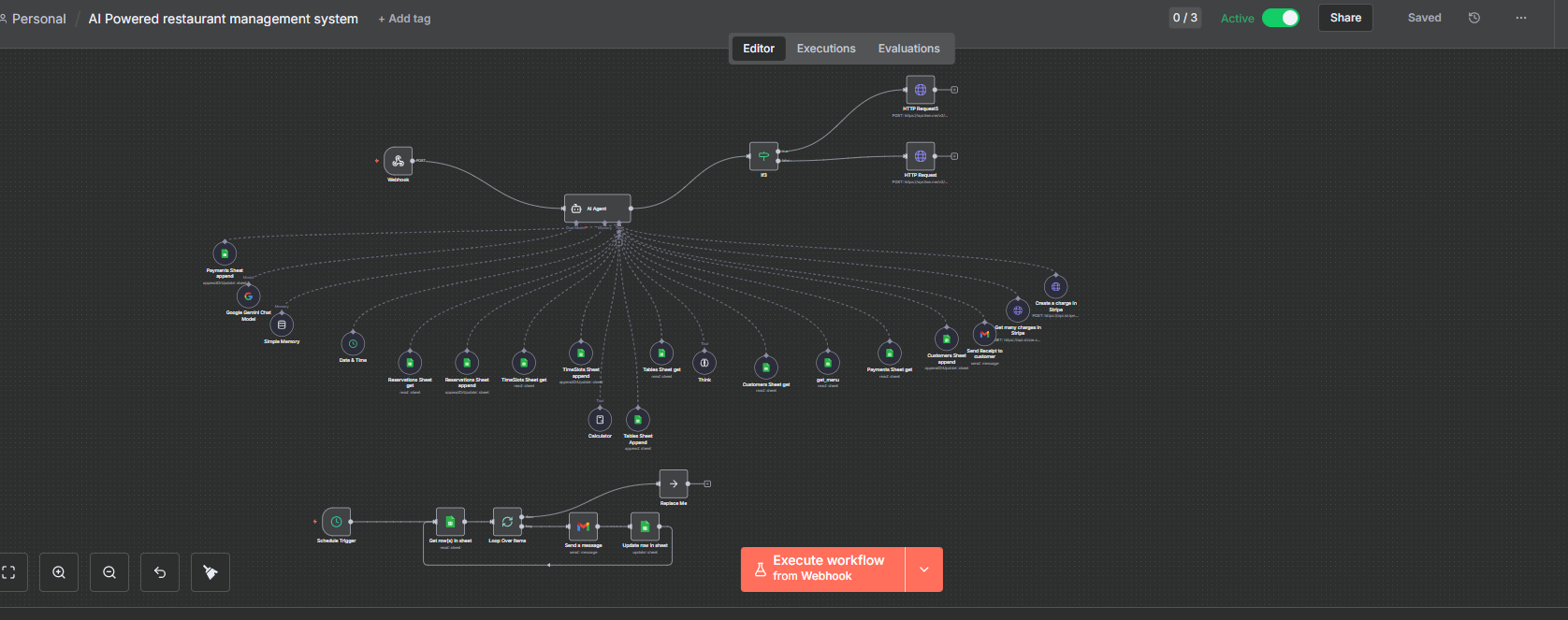
🚀 ReservaBot: Complete Restaurant Reservation & Payment Automation
💡 Use Cases & Benefits
For Restaurant Owners:
- ⏰ Saves 20+ hours per week on manual reservation management and payment collection
- 💰 Increases revenue by 35% by never missing bookings or payments (24/7 availability)
- 📉 Reduces no-shows by 60% with automated reminder emails sent before reservations
- 📊 Real-time analytics dashboard – Monitor revenue, bookings, and top customers instantly
- 🔄 Eliminates double-bookings with automated table availability management
For Customers:
- ✨ Book in 60 seconds via LINE messenger – no apps or websites needed
- 💳 Secure instant payments via Stripe with automatic receipt delivery
- 📧 Get confirmation & reminders – Never forget a reservation
- 🪑 Choose preferred tables – Window seats, booths, or center tables
For Your Staff:
- 🎯 Zero training required – System runs itself after initial setup
- 📱 Access from anywhere – Check bookings on any device
- 📤 Export data anytime – CSV downloads for accounting & analysis
📥 Input/Output Examples
INPUT (Customer Sends):
Customer via LINE: "Hi, I want to book a table for dinner"SYSTEM COLLECTS:
Bot: "How many guests will be dining?"
Customer: "4 people"

Bot: "What date would you like to reserve?"
Customer: "November 20, 2025"

Bot: "What time works best?"
Customer: "7:00 PM"

Bot: "May I have your name?"
Customer: "John Smith"

Bot: "Your phone number?"
Customer: "+1234567890"

Bot: "Your email address?"
Customer: "john@example.com"

Bot: "Here are available tables:
🪟 Window Tables: Window 1 (2-4 guests), Window 2 (2-4 guests)
🛋️ Booth Tables: Booth 1 (4-6 guests)
📍 Center Tables: Center 1 (2-3 guests)

Which table would you prefer?"

Customer: "Window 1"
CONFIRMATION SHOWN:
Please confirm your reservation:

👤 Name: John Smith
📞 Phone: +1234567890
📧 Email: john@example.com
📅 Date: November 20, 2025
⏰ Time: 7:00 PM
👥 Guests: 4
📍 Table: Window 1

Reply "yes" to confirm and proceed with payment.
OUTPUT (After Confirmation):
1️⃣ Customer Receives:
✅ Reservation Created!

📋 Details:
- Table: Window 1
- Date: November 20, 2025
- Time: 7:00 PM
- Guests: 4 × $10 = $40

💳 Complete payment here:
https://checkout.stripe.com/c/pay/cs_test_xxxxx

After payment, return to Line and write "done"!
2️⃣ Database Auto-Updates:
Google Sheets - Reservations Sheet:
├─ Reservation_ID: RES_20251120_847
├─ Customer_Name: John Smith
├─ Phone_Number: +1234567890
├─ Email: john@example.com
├─ Date: 2025-11-20
├─ Time_Slot: 19:00-21:00
├─ Guests: 4
├─ Table: Window 1
├─ Status: Pending
├─ Payment_Status: Pending
└─ Payment_Amount: $40.00

Tables Sheet:
├─ Table: Window 1
├─ Status: Reserved
└─ Reservation_ID: RES_20251120_847

Customers Sheet:
├─ Customer_ID: CUST_7890
├─ Name: John Smith
├─ Phone: +1234567890
├─ Email: john@example.com
└─ Total_Visits: 1

Payments Sheet:
├─ Payment_ID: PAY_20251120_143052
├─ Reservation_ID: RES_20251120_847
├─ Amount: $40.00
└─ Status: Pending
3️⃣ After Customer Pays & Types “done”:
🎉 Payment Confirmed!

✅ Reservation Confirmed:
- Confirmation #: RES_20251120_847
- Name: John Smith
- Table: Window 1
- Date: November 20, 2025
- Time: 7:00 PM
- Guests: 4
- Amount: $40

📧 Confirmation email sent to john@example.com
📧 Receipt: https://stripe.com/receipts/xxxxx

We look forward to serving you! 🍽️
4️⃣ Email Automatically Sent:
Subject: Reservation Confirmed - RES_20251120_847

Hi John Smith,

Your reservation is confirmed! 🎉

RESERVATION DETAILS:
━━━━━━━━━━━━━━━━━━━━
📋 Confirmation #: RES_20251120_847
👤 Name: John Smith
📍 Table: Window 1
📅 Date: November 20, 2025
⏰ Time: 7:00 PM
👥 Guests: 4
💰 Amount Paid: $40

RECEIPT:
https://stripe.com/receipts/xxxxx

We look forward to serving you!

Best regards,
Your Restaurant Team
5️⃣ Dashboard Updates in Real-Time:
Dashboard Overview:
├─ Total Revenue: $270 (+$40)
├─ Total Orders: 6 (+1)
└─ Latest Entry: John Smith - $40

Full Data Table Shows:
| Email              | Phone        | Table    | Customer   | Amount | Reservation ID  | Date       |
|-------------------|--------------|----------|------------|--------|-----------------|------------|
| john@example.com  | +1234567890  | Window 1 | John Smith | $40    | RES_20251120_847| 2025-11-20 |
6️⃣ Reminder Email (Day Before):
Subject: Reminder: Your Reservation for November 20, 2025

Hi John Smith,

This is a friendly reminder for your upcoming reservation tomorrow!

📋 Confirmation #: RES_20251120_847
📅 Date: November 20, 2025
⏰ Time: 7:00 PM
👥 Guests: 4
📍 Table: Window 1

We can't wait to serve you! 🍽️
📊 Anonymous Sample Data
Sample Reservation Flow:
Input: "Book table for 2, tomorrow at 6pm"

System Processes:
├─ Creates: RES_20251118_342
├─ Collects: Anonymous User, +11234567890, user@email.com
├─ Assigns: Window 2 table
├─ Generates: $20 Stripe link
└─ Status: Confirmed after payment

Output Dashboard Shows:
├─ Revenue: +$20
├─ Order Count: +1
├─ Customer: Anonymous User (CUST_7890)
└─ Table: Window 2 (Reserved)
Sample Analytics Output:
Dashboard Metrics (7-day period):
├─ Total Revenue: $450
├─ Total Reservations: 23
├─ Average Party Size: 3.2 guests
├─ Payment Success Rate: 98%
├─ Most Popular Time: 7:00 PM
├─ Top Table: Window 2 (8 bookings)
└─ Customer Retention: 35%

Top 5 Customers:
1. Guest A - $80 (4 visits)
2. Guest B - $60 (3 visits)
3. Guest C - $50 (2 visits)
4. Guest D - $40 (2 visits)
5. Guest E - $35 (1 visit)
🎯 What’s Included
Core System:
✅ n8n workflow (54 automation operations) ✅ LINE Bot integration (pre-configured) ✅ Stripe payment gateway setup ✅ 5 Google Sheets templates (auto-linked) ✅ Gmail automation (2 email templates) ✅ Real-time dashboard website
Documentation:
📄 Setup guide (step-by-step) 🎥 Video tutorials (installation & customization) 📋 API configuration instructions 🔧 Troubleshooting guide 💡 Customization examples
Support:
💬 Setup assistance 🛠️ Technical documentation 📧 Email support resources 🔄 Update guides
🚀 Quick Setup Process
Time Required: 45-60 minutes
Step 1: Import n8n workflow → 5 min
Step 2: Connect LINE Bot API → 10 min
Step 3: Setup Stripe account → 10 min
Step 4: Link Google Sheets → 5 min
Step 5: Configure Gmail → 5 min
Step 6: Deploy dashboard → 15 min
Step 7: Test reservation → 5 min
━━━━━━━━━━━━━━━━━━━━━━━━━━━━━
Total: ~55 minutes
✅ READY TO ACCEPT BOOKINGS!
💻 System Requirements
- n8n instance (cloud or self-hosted)
- LINE Business Account (free)
- Stripe Account (standard fees apply)
- Google Account (free)
- Gmail account (free)
- Web hosting for dashboard (optional)
📞 Get Started Today
Contact the BMaiKR Team Today!
By contacting us, you will immediately receive access to:
• The complete system files
• Detailed installation documentation
• Setup video tutorials
• Technical support information
We deliver Real systems. Real results. Real reservations.
🚀 Get started with BMaiKR.com today!
video: